

by
Login Start Free Trial
Auto-Sync

Saved on the Phone First, Synced After

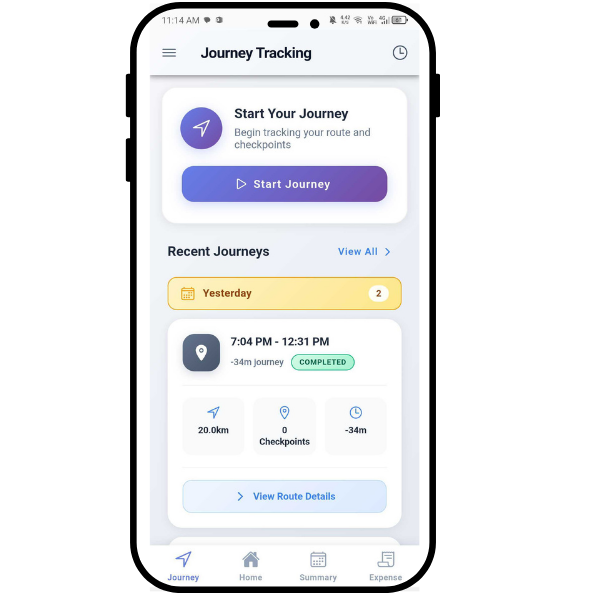
The app writes the journey to its own database on the handset as the day happens. When a connection is available it syncs to the server, so a dead zone costs you nothing.

On Device

Database

Synced

To The Server

Quality

Score Per Journey

Complete

Event Timeline

Saved on device
33.5 km
Stored locally
On DeviceStored
Written to local database
No connection needed
Survives app restart
Safe before it ever uploads

Written to the App’s Own Database

Journey data is not held in memory waiting for a connection. The app writes it to a database on the handset as the day happens, so it survives a dropped signal, a closed app or a restarted phone.

  • Stored in the app’s own database on the device
  • Written as the journey happens, not at the end
  • Survives signal loss and app restarts
  • No connection needed while the work is done
  • Runs on standard Android and iOS handsets
55%
GPS quality recorded for this journey
SyncUploading
Saved on device
Connection found
Synced to server
Nothing to re-key

Synced Up When There Is a Connection

Once the handset has a connection the stored journey syncs to the server. The office sees the completed record without anyone re-keying anything or chasing a driver for their numbers.

  • Syncs to the server when a connection is available
  • No manual upload step for the field team
  • Office sees the journey once it lands
  • Nothing to re-enter at the end of the day
  • Quality score recorded per journey
Saved to the device database
Connection available
Synced to the server
Ready to review
ArrivedComplete
Timeline events22
Street names resolved
Replay available
Nothing left to reconcile

The Record Arrives Complete

What syncs is not a bare line on a map. Moving segments, idle stops with street names, client visits and breaks all arrive in order, as one timeline.

  • Full event timeline once synced
  • Moving segments with distance and speed
  • Idle stops with duration and address
  • Client visits with start, end and duration
  • Replayable along the stored trail
Everything Included

What Syncs With the Journey

GPS Trail

The recorded path, drawn stop to stop.

Speed Figures

Average and maximum for the journey and each leg.

Battery Delta

Handset battery at the start and at the end.

Idle Stops

Every stop of a minute or more, with its address.

Checkpoints

Checkpoint count carried on the summary.

Breaks

Break periods recorded as their own event.

Simulate

Replay the trail once the journey has synced.

Quality Score

A GPS quality percentage per journey.

Works With

Pairs Well With These

Never Lose a Day to a Dead Zone

The app stores the journey on the handset and syncs it when a connection returns. Start your free trial today.
Cyber Track Mobile App
Auto-Sync
Hero Section
Tracking Car